Showing posts with label Apply for an oDesk Job. Show all posts

Tuesday, December 11, 2012

Tips to getting your first job in Odesk

Tips for Getting a Job in Odesk

Hi again to all online job seekers out there! Odesk could start giving you huge payouts in the long run, but if you're just starting, getting $5 pay is standard. Don't get discouraged by this, it's like, you're investing time and effort to get your big pay check someday. Here are a few tips to getting that first job.


  1. Take all those tests!    Believe it or not, employers look at these things. They are proof of your skills. And in Odesk, taking a test is free, so why not take advantage of it? Take the English tests and try to be in the top 10% of test takers. It matters.
  2. Fill up your profile. Post a profile picture. Summarize your skills in the 'overview' portion. Say something interesting about yourself. Post a file in the portfolio section. Fill up your profile!!! To illustrate the importance of a sassy profile - I cite me as an example. From my profile alone, I get offers from employers (so I didn't have to apply for some of my jobs - it's the employers who came to me). Be generous with your time in making your profile informative and interesting. It will pay in the long run.
  3. Look for jobs that say: 'newbies welcome'. They pay a pittance! Usually $5, but such employers give 5-star reviews, which is what you need for other, future employers to consider you. Choose the category where you want to get the most jobs in. Say, if you want to be a transcriber, then apply to transcriber jobs which welcome newbies.
  4. Don't be impatient. Odesk jobs pay small at first, but once you've been in Odesk for as long as I have (2 years), the big jobs would come to you. Be patient, ok? It's worth it!
Well, I have to go back to my Odesk job. Good luck!

Friday, May 7, 2010

The Step by Step Guide to Getting a Job in oDesk


We now go to a very important step:

Step 5. Apply for an oDesk Job

There are two ways to get a job on odesk: either you apply for one, or you get invited for an interview (the buyer invites you). If you're a newbie, no one's going to invite you. You have to look for a job you like and apply for it. Jobs could be fixed price or hourly, but  if you're a newbie, you'd have more chances landing a fixed price job than an hourly one.

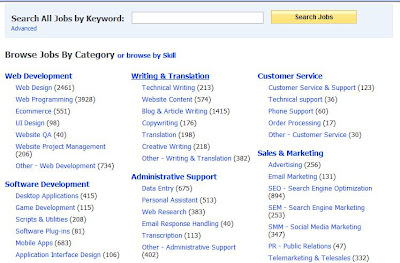
a. On the menu, click "Find providers and jobs" then click "Find jobs".

b. A page containing the different categories of jobs will be displayed:


c. Click the job category that you like.

d. A list of jobs would appear. Select the job you like.

e. Click "Apply". Input your bid, your duration, a short cover letter. Since you're a newbie, lower your bid as much as possible. Many buyers are price conscious. Tailot-fit your cover letter to what the job requires. Make it as unique as possible and not a spam cover letter. If possible, attach a sample of your work. Buyers hire not only on price, but also on the quality of your cover letter and sample.

f. Check your inbox daily to see if any buyer wants to interview you or hire you.

g. The interview may be through email, where the provider will test your skills through your answer/s to their question/s. It could also be through Skype, so make sure you have a Skype address.

Additional tip: apply only for the jobs you can surely accomplish on time, because your life as a provider depends on the feedback. If you cannot accomplish the job on time, it will definitely reflect on your feedback.

Good luck!


About Me

My photo
just my take on politics and culture